Falcon A1C 10W specs
| Brand | Creality |
|---|---|
| Laser type | Diode (455 nm blue diode) |
| Output power | 10 W diode (output); 5 W diode and 1.2 W 1064 nm IR modules swap in |
| Format | Enclosed |
| Work area | 150 × 150 mm (5.9 × 5.9 in). 148 mm clearance under the laser head |
| Max speed | 250 mm/s (maker rating) |
| Laser class | Class 1 |
| Cuts wood | Up to 5 mm (maker claim) |
| Clear acrylic | No |
| Metal | Coated metal only |
| Air assist | Not available |
| Camera | Yes |
| Autofocus | Yes |
| Rotary | Optional add-on |
| Software | Falcon Design Space, LightBurn |
| Connectivity | USB, Wi-Fi (2.4 GHz, set up through the phone app), app |
| Weight | 21.6 lb |
| Warranty | 1 year |
| Price tier | $ Budget (under $500). See Amazon for today's price. |
- Creality doesn't publish a cut depth. 3DPrinting.com's single-pass test got through 5 mm plywood with no margin to spare; we use 5 mm.
- No air assist is listed. The A1C has a built-in exhaust fan and hose, so plan to vent outside or add a purifier.
- Amazon carries two 10 W A1C listings at $399 (B0H5WTQNYH 'AI Camera' and B0H412D1NH). TechRadar saw the 10 W AI-camera model at $379 on Amazon in Aug 2026. Creality also sells a cheaper basic version without the camera on its own store.
- Blue-diode goggles don't protect against the invisible 1064 nm beam of the optional IR module.
Bundles and power options
Each option is a separate Amazon listing. Prices are typical street prices, not live.
| Option | What's different | Price |
|---|---|---|
| Falcon A1C 5W | Lower-power 5 W diode, same enclosure and camera | Check price |
| Falcon A1C 10W (AI camera) | Our pick: 10 W diode with AI camera | Check price |
| Falcon A1C 10W + 1.2W IR | Adds the IR module for bare stainless and dark stone | Check price |
Specs are compiled from manufacturer listings and independent reviews and may change between production runs. Laser makers re-bundle often, so confirm what's in the box on the Amazon page before buying.
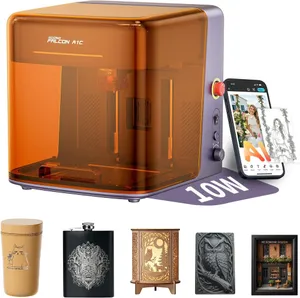
The Creality Falcon A1C 10W is a small, enclosed diode laser with autofocus and an AI placement camera, and it costs about $379–399 (check today’s price). That makes it the cheapest Class 1 machine in our guide and our budget pick for beginners and families who want a goggles-free laser for coasters, tags and small gifts. The catch is the bed: 150 × 150 mm. If you’re not sure that’s enough, the laser matcher will tell you quickly.
Who the A1C is for (and who should skip it)
It’s for anyone whose projects fit in your hand: one 90 mm coaster at a time, keychains, pet tags, small wood ornaments, leather patches. It’s also an easy fit for classrooms and homes with kids. TechRadar highlights the removable USB safety key on the back; pull it and the machine won’t run. The footprint is 336 × 377 mm, small enough for a desk.
Skip it if you want to make signs, cutting boards or anything over about 6 in across. Skip it too if cutting is the goal. Creality publishes no cut depth, and 3DPrinting.com only just got through 5 mm plywood in one pass. The Creality Falcon A1 gives you a 381 × 305 mm bed in a similar Class 1 box, and the xTool M2 is bigger again with a smoother camera workflow.
Key capabilities
The A1C borrows features from far pricier machines. Autofocus uses a pin that lowers to the material, and TechRadar found it faultless over a month of use, as long as the reviewer remembered to trigger it from the app before every job. The head doesn’t lift back out of the way after focusing. The platform rises and lowers with a side knob, which is how a small rotary fits inside for mugs and cups.
The camera handles placement. 3DPrinting.com found positioning simply right once the camera was working, though one reviewer’s camera cable shipped loose. TechRadar found the preview a little dark on darker materials. Buy the AI-camera version: TechRadar notes the basic A1C has no camera and can’t be upgraded to one.
Modules swap without tools. Besides the 10 W diode there’s a 5 W diode and a 1.2 W IR head, which marked bare stainless and dark stone well in 3DPrinting.com’s testing. The blue diode by itself is a coated-metal machine: powder-coated tumblers and anodized aluminum mark well, bare steel doesn’t. Check specific materials in the material checker.
Day-to-day use
Creality’s Falcon Design Space runs on Windows, macOS and a phone app, and LightBurn is supported too, which is unusual at this price. Wi-Fi and camera setup run through the phone app on 2.4 GHz only. TechRadar found setup took about 10 minutes, with one extra wired step on a Mac before switching to Wi-Fi. Expect a few rough edges a beginner will notice. The rated top speed is 250 mm/s, slower than bigger CoreXY machines, though on a 150 mm bed that matters less.
What you’ll need beyond the box
- Ventilation. The A1C has an exhaust fan and hose but no filter. Run the hose outside or connect a purifier. TechRadar used a third-party desktop filter with no issues, so you’re not locked to Creality’s. See the ventilation guide.
- Eye protection. None needed for the blue diode with the lid shut. If you add the IR module, keep 1064 nm-rated goggles on hand for any lid-open work, since blue-diode glasses don’t cover it.
- Air assist. Not available. Expect a little more char on cuts than machines with an air pump.
- Rotary. Optional; the raising platform lets one fit inside.
- Fire safety. An ABC extinguisher within reach and no unattended jobs. More on our accessories page.
Reliability and warranty
The A1C is a 2026 machine, so there’s no long-term owner record yet. Creality covers it for one year. TechRadar called the all-plastic build slightly cheap-feeling but sturdy, and its 9.8 kg weight keeps it planted. Amazon carries two 10 W listings at $399, and TechRadar saw the AI-camera 10 W at $379 on Amazon in August 2026. If the IR head is likely, the $542 bundle beats buying the module later at about $239.
Bottom line
The A1C proves an enclosed, autofocus, camera-guided laser no longer needs to cost $500, and TechRadar and 3DPrinting.com both came away impressed with its engraving. Treat it as a coaster-and-keychain machine with an IR upgrade path, not a sign maker or a cutter. If that matches your projects, it’s the safest cheap start in our budget laser roundup. If you want raw power for similar money and can manage an open frame, compare the Atomstack A20 Pro V2. Check the current price and version on Amazon.
Accessories for the Falcon A1C 10W
Official and universal add-ons sold on Amazon — safety glasses, fume extraction, air assist, rotaries and materials. Check the listing confirms your exact model before you buy.
- UpgradeCreality Falcon A1C 1.2W IR laser moduleOfficial Creality
Tool-free swap that marks bare stainless, jewelry and dark stone the blue diode can't.
- SafetyCARLANY 190–490 nm OD6+ laser safety glassesUniversal fit
Blue-diode protection for anyone near an open-frame laser, or when you lift the lid or override an interlock on an enclosed one. Covers 445–455 nm blue diodes only; does not protect against 1064 nm IR/fiber or 10.6 µm CO2. Match the OD rating to your laser's wavelength.
- SafetyCloudray 1064 nm laser safety gogglesCompatible, third-party
The invisible 1064 nm beam of fiber and IR lasers needs its own eyewear; blue-diode glasses won't stop it. For 1064 nm sources only. Dual-laser machines need protection for both wavelengths; check the OD rating on the listing.
- SafetyAmerex B417T 2.5 lb ABC fire extinguisher with bracketUniversal fit
Lasers cut by burning; a small ABC extinguisher mounted beside the machine is the cheapest fire insurance you can buy. Dry-chemical powder can ruin a laser's optics and electronics; LightBurn recommends a CO2 extinguisher for the machine itself.
- SafetyAmerex 322 5 lb carbon dioxide (CO2) fire extinguisherUniversal fit
Class B:C CO2 leaves no powder residue, so it puts out a fire in the machine without destroying the optics. Pricier than ABC; not rated for Class A (wood/paper) fires on its own, so keep a fire blanket too.
- SafetyPrepared Hero emergency fire blanket, 39 × 39 in (2-pack)Universal fit
Smothers a flare-up on the bed without coating the machine's optics in extinguisher powder.
- Fumes & enclosureAC Infinity Cloudline S4 4-inch inline duct fan with speed controllerUniversal fit
Boosts a laser's built-in exhaust over long duct runs so smoke actually leaves the room. Check your machine's exhaust port diameter; adapters may be needed.
- Fumes & enclosureVIVOSUN 4-inch aluminum ducting, 25 ft with clampsUniversal fit
Replaces short stock hoses so you can reach a window or wall vent; foil duct tolerates hot exhaust better than vinyl.
- Materials3 mm basswood plywood sheets, 12 × 12 in (12-pack)Universal fit
The default test and project stock for every laser here; 12 × 12 in fits all but the smallest beds. Cut down for the 150 mm A1C or galvo machines.
- MaterialsVIBRATITE 4-inch square black slate coasters (60-pack)Universal fit
Best-selling laser blank: slate engraves light grey on black with any diode, CO2 or IR source.
Compatibility checked October 2026. More in our laser engraver accessories guide.
Featured in our guides
- The 7 Best Laser Engravers of 2026: Ranked for Home, Craft and Small Business
- The Best Laser Engraver for Beginners in 2026: 5 Safe, Easy Picks
- The Best Budget Laser Engravers Under $500 in 2026 (and the Safety Trade-Offs)
- The Best Enclosed Laser Engravers of 2026: Which Are Really Class 1?