Falcon A1 10W specs
| Brand | Creality |
|---|---|
| Laser type | Diode (455 nm blue diode) |
| Output power | 10 W diode (output); sold as '80W' (electrical) |
| Format | Enclosed |
| Work area | 381 × 305 mm (15 × 12 in) |
| Max speed | 600 mm/s (maker rating) |
| Laser class | Class 1 |
| Cuts wood | Up to 6 mm (maker claim) |
| Clear acrylic | No |
| Metal | Coated metal only |
| Air assist | Included |
| Camera | Yes |
| Autofocus | No |
| Rotary | Optional add-on |
| Software | Falcon Design Space, LightBurn, LaserGRBL |
| Connectivity | USB |
| Weight | 34.3 lb |
| Warranty | 1 year |
| Price tier | $$ Mid-range ($500–$1,500). See Amazon for today's price. |
- '80W' in the Amazon title is marketing (electrical); the listing itself states 'Power Output Level 10000mW'.
- Cut depth: Creality's white-version Amazon listing (B0FDVDG5B3) claims 6 mm wood and 9.6 mm black acrylic in a single pass, while the black-version listing says acrylic must be coated to engrave and cutting it isn't supported. Treat acrylic cutting as unconfirmed.
- The listing warns it isn't compatible with Creality's 500 × 500 mm honeycomb; use the A1-specific bed.
- Creality's spec table lists USB as the only connection; there's no touchscreen or offline mode.
Bundles and power options
Each option is a separate Amazon listing. Prices are typical street prices, not live.
| Option | What's different | Price |
|---|---|---|
| Falcon A1 10W | Our pick: machine only (black; white is the same price) | Check price |
| Falcon A1 + Rotary Roller Pro | Adds Creality's 3-in-1 rotary for tumblers and glasses | Check price |
| Falcon A1 + smoke purifier | Adds a desktop purifier for rooms you can't vent | Check price |
Specs are compiled from manufacturer listings and independent reviews and may change between production runs. Laser makers re-bundle often, so confirm what's in the box on the Amazon page before buying.
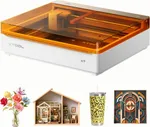
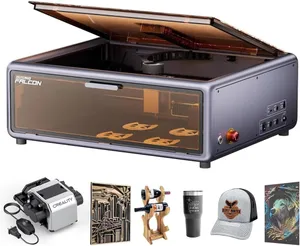
The Creality Falcon A1 10W is a full-size enclosed diode laser: a Class 1 dual-door box, a pre-calibrated placement camera and a 381 × 305 mm bed for about $549 (check today’s price). Creative Bloq called it the perfect laser for beginners on a budget, and it’s the value pick among full-size enclosed machines. You pay for that price in convenience, with USB-only control and manual focus. To see whether it fits your projects, try the laser matcher.
Who the Falcon A1 is for (and who should skip it)
It’s for beginners and hobbyists who want a goggles-free laser that can handle signs, cutting boards and batches of coasters, and who have a laptop they don’t mind parking next to it. The bed is bigger than the Falcon A1C or Glowforge Aura, and LightBurn support means you won’t outgrow the software.
Skip it if you want to send jobs from a phone or run the laser without a computer; the Falcon A1 Pro adds Wi-Fi, a touchscreen and autofocus. Skip it if cutting thick stock is the goal, since 10 W limits it to thin material. And if you want autofocus and a smoother guided workflow at a similar price, compare the xTool M2.
Key capabilities
Don’t let the “80W” in the listing title mislead you; that’s electrical input, and the listing states 10 W of output. Our wattage explainer covers why that matters. At 10 W, Creality’s white-version listing claims 6 mm wood in a single pass. Acrylic is murkier: that same listing claims 9.6 mm black acrylic, while the black-version listing says acrylic cutting isn’t supported. We treat acrylic cutting as unconfirmed, and clear acrylic is impossible on any blue diode.
The camera is the convenience feature that matters. It comes pre-calibrated, so you can drag a design onto the material on screen and run batch jobs without measuring. CoreXY motion rated to 600 mm/s keeps engraving reasonably quick across the big bed.
Metal is coated-only: powder-coated tumblers and anodized aluminum mark well, bare steel doesn’t. Check specific materials in the material checker.
Day-to-day use
This is where the A1 shows its price. Creality’s spec table lists USB as the only connection, with no touchscreen or offline mode, and Creative Bloq’s reviewer couldn’t run it without a wired laptop. Focus is manual with a stepped focus block, and you’ll repeat it every time you change material thickness. Neither is a deal-breaker, but both add steps a camera-and-autofocus machine skips.
Software is flexible. Creality’s free Falcon Design Space covers the basics, and LightBurn and LaserGRBL are supported for more control. The machine weighs 34.3 lb (15.5 kg), heavy and bulky for a 10 W laser, so pick its spot before you unbox it.
What you’ll need beyond the box
- Ventilation. Every laser needs it. Duct the exhaust outside or, if you can’t, consider the Falcon A1 + smoke purifier bundle (about $603), which is about $54 more than the machine alone. Our ventilation guide compares both routes.
- Eye protection. Not needed with the doors closed; it’s Class 1.
- Air assist. Included in the box.
- Rotary. For tumblers and glasses, the A1 + Rotary Roller Pro bundle cost only about $10 more than the bare machine when we checked, far less than the Rotary Roller Pro kit alone (about $114).
- Honeycomb bed. The listing warns that Creality’s 500 × 500 mm honeycomb doesn’t fit. Use the A1-specific honeycomb (about $69) for cleaner cuts.
- Fire safety. An ABC extinguisher within reach, and never leave a job running. More on our accessories page.
Reliability and warranty
Creality covers the A1 for one year. The Class 1 enclosure has dual doors, a lid-open stop and an emergency stop. The black and white versions sell at the same price on separate listings; the acrylic disagreement above comes from those two listings, so read the one you’re buying.
Bottom line
The Falcon A1 gets the important things right for about $549: a Class 1 box, a camera and a bed big enough for signs, plus LightBurn support. It’s less convenient than its rivals because of USB-only control and manual focus, and 10 W keeps cutting to thin stock. If you mostly engrave and have a laptop handy, it’s excellent value. If you’ll cut a lot or want Wi-Fi and autofocus, read our Falcon A1 vs Falcon A1 Pro comparison before choosing. More enclosed options are in our best enclosed lasers guide. Check today’s price and bundles on Amazon.
Accessories for the Falcon A1 10W
Official and universal add-ons sold on Amazon — safety glasses, fume extraction, air assist, rotaries and materials. Check the listing confirms your exact model before you buy.
- RotaryCreality Rotary Roller Pro 3-in-1 kitOfficial Creality
Jaw-chuck and roller rotary for engraving cups, glasses and rings on Falcon lasers. Sold for 'Falcon and other engraving machines'; Creality also bundles it with the A1 and A1 Pro. Confirm riser height for your model.
- Bed & riserCreality honeycomb laser bed for Falcon A1 / A1 ProOfficial Creality
Sized for the A1 enclosure (the 500 × 500 mm Creality bed doesn't fit) for cleaner cuts and a protected base plate.
- SafetyCARLANY 190–490 nm OD6+ laser safety glassesUniversal fit
Blue-diode protection for anyone near an open-frame laser, or when you lift the lid or override an interlock on an enclosed one. Covers 445–455 nm blue diodes only; does not protect against 1064 nm IR/fiber or 10.6 µm CO2. Match the OD rating to your laser's wavelength.
- SafetyAmerex B417T 2.5 lb ABC fire extinguisher with bracketUniversal fit
Lasers cut by burning; a small ABC extinguisher mounted beside the machine is the cheapest fire insurance you can buy. Dry-chemical powder can ruin a laser's optics and electronics; LightBurn recommends a CO2 extinguisher for the machine itself.
- SafetyAmerex 322 5 lb carbon dioxide (CO2) fire extinguisherUniversal fit
Class B:C CO2 leaves no powder residue, so it puts out a fire in the machine without destroying the optics. Pricier than ABC; not rated for Class A (wood/paper) fires on its own, so keep a fire blanket too.
- SafetyPrepared Hero emergency fire blanket, 39 × 39 in (2-pack)Universal fit
Smothers a flare-up on the bed without coating the machine's optics in extinguisher powder.
- Fumes & enclosureAC Infinity Cloudline S4 4-inch inline duct fan with speed controllerUniversal fit
Boosts a laser's built-in exhaust over long duct runs so smoke actually leaves the room. Check your machine's exhaust port diameter; adapters may be needed.
- Fumes & enclosureVIVOSUN 4-inch aluminum ducting, 25 ft with clampsUniversal fit
Replaces short stock hoses so you can reach a window or wall vent; foil duct tolerates hot exhaust better than vinyl.
- Materials3 mm basswood plywood sheets, 12 × 12 in (12-pack)Universal fit
The default test and project stock for every laser here; 12 × 12 in fits all but the smallest beds. Cut down for the 150 mm A1C or galvo machines.
- MaterialsVIBRATITE 4-inch square black slate coasters (60-pack)Universal fit
Best-selling laser blank: slate engraves light grey on black with any diode, CO2 or IR source.
Compatibility checked October 2026. More in our laser engraver accessories guide.
Featured in our guides
- The Best Laser Engraver for Beginners in 2026: 5 Safe, Easy Picks
- The Best Budget Laser Engravers Under $500 in 2026 (and the Safety Trade-Offs)
- The Best Enclosed Laser Engravers of 2026: Which Are Really Class 1?
- The Best Laser Engraver for Tumblers in 2026: Rotary-Ready Picks