The Best Enclosed Laser Engravers of 2026: Which Are Really Class 1?
Our top picks
 Best enclosed for most homes: Class 1, 20 W, autofocus, Wi-Fi and touchscreen, about $1,099Creality Falcon A1 Pro 20W20 W diode · Enclosed · 358 × 268 mm8.2Price tier: Mid-rangeCheck price on Amazon
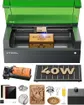 Most cutting power in a Class 1 box: 40 W diode and a 498 × 319 mm bed, about $1,819xTool S1 40W Enclosed Diode Laser40 W diode · Enclosed · 498 × 319 mm8.5Price tier: PremiumCheck price
 Easiest Class 1 laser: two cameras, autofocus, arrives assembled, about $499xTool M2 10W Color Craft Laser10 W diode · Enclosed · 426 × 320 mm8.5Price tier: BudgetCheck price
 Biggest Class 1 bed under $600: 381 × 305 mm with a camera, about $549Creality Falcon A1 10W10 W diode · Enclosed · 381 × 305 mm7.9Price tier: Mid-rangeCheck price
 Cheapest Class 1: compact 10 W with camera and autofocus, about $380–400Creality Falcon A1C 10W (AI Camera)10 W diode · Enclosed · 150 × 150 mm7.8Price tier: BudgetCheck price
 Class 1 CO2 for shops: 80 W, 915 × 458 mm bed, fire suppression, about $6,300–7,900xTool P3 80W Flagship CO2 Laser80 W co2 · Enclosed · 915 × 458 mm8.6Price tier: ProCheck price
“Enclosed” is one of the most stretched words in laser listings. Some enclosed machines are certified Class 1, meaning the beam stays inside while the lid is shut. Others have a lid, a tinted shield or a cone around the lens and are still rated Class 4. One Amazon listing calls an open-beam fiber marker “Class 1.” If you want a laser you can run in a home office, classroom or shared room without handing everyone goggles, the rating matters more than the box.
This guide lists the enclosed lasers we’d buy and sorts every lidded machine we track by its actual class. It’s research-based, drawn from manufacturer specs, Amazon listings and independent reviews; we haven’t used these machines ourselves. Prices are from Amazon on October 29, 2026, so check today’s price before you order.
What Class 1 means, and what it doesn’t
The FDA’s laser classes run from Class I (considered non-hazardous) to Class IV, which is an immediate eye and skin hazard from the direct or reflected beam and may present a fire hazard. Every engraver here contains a Class 4 laser. A Class 1 machine adds an enclosure, filtered windows and interlocks that keep that light inside during normal use.
Three limits are worth knowing:
- Class 1 holds only with the lid shut and interlocks working. Never defeat a lid switch. Tom’s Hardware’s M2 review makes the same warning.
- Accessories can change the class. xTool sells separate Class 1 and Class 4 riser bases for the S1. Rotary and conveyor jobs on some machines run with the lid open.
- It covers light, not smoke or fire. You still need ventilation, an extinguisher and supervision.
Which lidded lasers are actually Class 1?
| Laser | What it looks like | Rated class | Price |
|---|---|---|---|
| xTool M2 10W | Enclosed diode | Class 1 (TÜV SÜD certified) | ~$499 |
| Creality Falcon A1C 10W | Compact enclosed diode | Class 1 | ~$380–400 |
| Creality Falcon A1 10W | Enclosed diode | Class 1 | ~$549 |
| Creality Falcon A1 Pro 20W | Enclosed diode | Class 1 | ~$1,099 |
| Glowforge Aura | Enclosed diode | Class 1 (embedded Class 4) | ~$1,104 |
| xTool S1 40W | Enclosed diode | Class 1 | ~$1,819 |
| xTool P3 | Enclosed CO2 | Class 1 | ~$6,300–7,900 |
| xTool P2S | Enclosed CO2 | Class 4 (enclosed lid) | ~$2,919 |
| xTool F1 Ultra | Lidded galvo | Class 4 (enclosed lid) | ~$2,499 |
| xTool F2 Ultra | Lidded galvo | Class 4 (enclosed lid) | ~$5,099 |
| xTool F2 | Galvo with shield | Class 4 | ~$1,219 |
| LaserPecker LP5 | Galvo with cone shield | Class 4; Class 1 with optional enclosure | ~$2,899 |
| OMTech K40+ | Enclosed CO2 with door interlock | Not stated; treat as Class 4 | ~$760–800 |
| ComMarker B4 20W | Open-beam fiber marker | Listing says Class 1; treat as Class 4 | ~$1,400–1,720 |
1. Creality Falcon A1 Pro 20W: Best enclosed laser for most homes
The Falcon A1 Pro is the Class 1 machine we’d recommend to the most people. Its 20 W diode cuts real stock (Creality says 10 mm basswood and 8 mm black acrylic “with fewer passes,” without saying how many), and built-in air assist, flame and tilt detection, roughly 3-second camera autofocus, a 4.3-in touchscreen and Wi-Fi mean it runs without a tethered PC. It supports LightBurn, and an optional 2 W IR head adds bare-metal and plastic marking.
It costs about $1,099, around $700 less than the S1. The bed (358 × 268 mm) is smaller than the cheaper Falcon A1’s, and Gadget Review and owners report spotty Wi-Fi and occasionally buggy software. The “180W” in the listing title is electrical input; the laser is 20 W. On October 29, 2026, Amazon priced the rotary bundle below the bare machine. Check the A1 Pro price.
2. xTool S1 40W: Most cutting power in a Class 1 box
The xTool S1 40W is the strongest diode you can run in a shared room. xTool claims 18 mm cherry wood in a single pass, the 498 × 319 mm bed is the biggest of the enclosed diodes, and a conveyor passthrough handles stock up to 3 m long. Multi-point autofocus, curved-surface engraving, five flame sensors, an emergency stop and LightBurn support round it out.
There’s no camera, air assist is an add-on, and like any blue diode it can’t cut clear acrylic. Keep it Class 1 by using xTool’s Class 1 riser base (125 mm clearance) rather than the Class 4 version if you need height for a rotary. Stock is the bigger worry: Amazon’s only S1 listing, at about $1,819, is a “Rotary Bundle,” so confirm the box contents, and xTool’s Canadian store lists the S1 under clearance. Check the S1 price.
3. xTool M2 10W: Easiest Class 1 laser
The xTool M2 is the most beginner-proof Class 1 machine at about $499. It’s TÜV SÜD certified, arrives assembled, and uses two cameras plus autofocus for drag-and-drop placement. Air assist and an exhaust fan are built in, and the 426 × 320 mm bed is generous. The 10 W head cuts thin stock only (8 mm basswood in one pass, per xTool), the software is xTool Studio only, and there’s no external air port. Swappable 20 W and 40 W heads add cutting power later. Check the M2 price.
4. Creality Falcon A1 10W: Biggest Class 1 bed under $600
The Falcon A1 gives you a 381 × 305 mm bed, a dual-door Class 1 enclosure with lid-open stop and emergency stop, a pre-calibrated camera and included air assist for about $549. Creative Bloq’s reviewer called it ideal for beginners on a budget. It’s USB-only with manual focus, its “80W” title is electrical input for a 10 W laser, and Creality’s listings disagree on acrylic cutting. Check the Falcon A1 price.
5. Creality Falcon A1C 10W: Cheapest Class 1
The Falcon A1C brings Class 1 down to about $380–400, with flame, tilt and USB-key lockouts, an AI camera and an autofocus pin. TechRadar praised the enclosure over open-frame alternatives. The 150 × 150 mm bed limits it to coasters, tags and small gifts, and there’s no air assist. If you add the 1.2 W IR module, remember that blue-diode goggles don’t protect against its invisible 1064 nm beam when the lid is open. Check the A1C price.
6. xTool P3: Class 1 CO2 for shops
The xTool P3 is the only Class 1 CO2 we track. Tom’s Hardware highlights the certification as an upgrade over the Class 4 P2, along with eight flame detectors, a temperature sensor and a built-in CO2 flame-suppression canister. It has an 80 W tube, a 915 × 458 mm bed, a built-in chiller and motorized autofocus, and it cuts clear acrylic.
It’s also 231 lb, about 1.25 m wide and locked to xTool Studio, with no LightBurn. At about $6,300–7,900 it’s a production tool for shops and schools, not a home machine. Check the P3 price.
Also Class 1: Glowforge Aura
The Glowforge Aura is Class 1 and very simple to use, and its Amazon bundle includes a filter so it can run without a window vent. We don’t rank it higher because it’s only 6 W at about $1,104, it needs Glowforge’s cloud and Wi-Fi to run, and Glowforge went through an Assignment for the Benefit of Creditors in November 2025 before its co-founders bought back the assets. The Amazon offer we saw came from a third-party seller with low stock. See xTool M2 vs Glowforge Aura.
Enclosed-looking, but Class 4
These are good machines. They just don’t give you Class 1’s no-goggles convenience, so plan eyewear and room use around them.
- xTool P2S. Our best overall laser is a fully lidded CO2, but the standard machine is rated Class 4. xTool’s product page says a Class 1 variant also exists; if you need Class 1, confirm which version a listing sells before ordering.
- xTool F1 Ultra and F2 Ultra. Both have enclosed lids (the F1 Ultra’s cover filters both of its wavelengths), but xTool rates them Class 4. On the F2 Ultra, conveyor and rotary jobs run with the lid open and the interlock overridden, so you need goggles for both 455 nm and 1064 nm.
- xTool F2. The shield isn’t a Class 1 enclosure. Wear eyewear rated for 455 nm and 1064 nm.
- LaserPecker LP5. The base unit’s cone shield leaves a gap. LaserPecker’s enclosure (about $559, or bundled for less) makes it Class 1.
- OMTech K40+. It has a door interlock and emergency stop, but OMTech doesn’t state a class. Treat it as Class 4 and never defeat the interlock.
- ComMarker B4. The listing’s “Class 1” line doesn’t match an open-beam galvo marker. Use the supplied 1064 nm goggles, or ComMarker’s enclosure.
Class 1 still needs ventilation and fire safety
An enclosure keeps the beam in, but not the fumes. Every machine here needs its exhaust run outside or into a purifier sized for it, and someone watching while it runs.
Open-frame and galvo lasers are usually Class 4: reflected light can injure eyes. Wear glasses rated (OD 5+ is common guidance) for your laser's exact wavelength — 450 nm diode glasses don't protect against 1064 nm IR. Enclosed Class 1 machines contain the beam while the lid is shut.
Every material makes smoke; some make toxic smoke. Vent outdoors with a duct fan or use a rated smoke purifier, and never laser PVC or vinyl.
Lasers set things on fire by design. Never leave a job running unattended, keep air assist on, keep a CO2 or water-mist extinguisher and a fire blanket within reach.
Put the laser on a non-flammable surface, away from curtains and kids' reach, with power you can cut instantly (emergency stop or switched outlet).
Full checklist in our laser safety guide and ventilation guide.
Our ventilation guide covers duct runs and purifiers, and the safety guide covers eyewear and fire gear.
Which enclosed laser should you buy?
- Most homes, want real cutting and convenience: Falcon A1 Pro.
- Thickest cuts in a classroom, office or shared space: xTool S1 40W, if you can find stock.
- First laser, easiest setup: xTool M2 10W.
- Bigger bed on a budget: Falcon A1.
- Lowest price, small items: Falcon A1C.
- Production shop that needs Class 1 CO2: xTool P3.
- Can vent outdoors and accept Class 4 for CO2 cutting: xTool P2S.
The laser matcher can filter for enclosed machines, and our beginner picks go deeper on first lasers.
Frequently asked questions
Which laser engravers are Class 1?
Do I need goggles with an enclosed laser?
Does an enclosure make an open-frame laser Class 1?
Do enclosed lasers still need ventilation?
Sources
- FDA: Laser Products and Instruments (laser hazard classes) · checked 2026-10-30 — Class I lasers are considered non-hazardous; Class IV lasers are an immediate eye and skin hazard from direct or reflected beams and may present a fire hazard.
- Tom's Hardware: xTool P3 review · checked 2026-10-30 — The P3 is certified Class 1 (an improvement over the Class 4 P2), with eight flame detectors, a temperature sensor and a built-in CO2 flame-suppression canister.
- xTool: S1 laser cutter product page · checked 2026-10-30 — xTool lists separate Class 1 and Class 4 riser bases for the S1 (125 mm and 133.5 mm clearance).
- xTool: P2S 55W desktop CO2 laser cutter product page · checked 2026-10-30 — xTool says the P2S comes in both Class 4 and Class 1 variants.
- Tom's Hardware: xTool M2 color craft laser and engraver review · checked 2026-10-30 — The M2's enclosed design claims Class 1 safety, stopping accidental exposure to the Class 4 diode inside; reviewers warn not to override the built-in safety.
Get new guides by e-mail
One short e-mail when Laser Engravers Guide publishes a new guide. No spam, no sharing your address, and you can unsubscribe in one click.