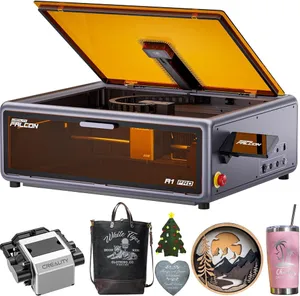
Falcon A1 Pro specs
| Brand | Creality |
|---|---|
| Laser type | Diode (455 nm blue diode (optional 1064 nm IR module)) |
| Output power | 20 W diode (output); optional 2 W IR; sold as '180W' (electrical) |
| Format | Enclosed |
| Work area | 358 × 268 mm (14.1 × 10.6 in) |
| Max speed | 600 mm/s (maker rating) |
| Laser class | Class 1 |
| Cuts wood | Up to 10 mm (maker claim) |
| Clear acrylic | No |
| Metal | Marks bare metal |
| Air assist | Built in |
| Camera | Yes |
| Autofocus | Yes |
| Rotary | Optional add-on |
| Software | Falcon Design Space, LightBurn, LaserGRBL |
| Connectivity | USB, Wi-Fi, app; 4.3-in touchscreen |
| Weight | 37 lb |
| Warranty | 1 year |
| Price tier | $$ Mid-range ($500–$1,500). See Amazon for today's price. |
- '180W' in the Amazon title is marketing (electrical); the listing states 'power output level 20000mW'.
- Creality says it handles 10 mm basswood and 8 mm black acrylic 'with fewer passes'; it doesn't say how many.
- Creality lists stainless steel as 20 W diode-engravable (a slow dark mark); the optional 2 W IR head is the better tool for bare metal.
- Prices move: on Oct 29, 2026 the rotary bundle ($1,011.99) undercut the bare machine ($1,099) on Amazon, and Creality's own store had the A1 Pro on sale at $879.
Bundles and power options
Each option is a separate Amazon listing. Prices are typical street prices, not live.
| Option | What's different | Price |
|---|---|---|
| A1 Pro + Rotary Roller kit | Bundle with Creality's 3-in-1 rotary; priced below the bare machine on Oct 29, 2026 | Check price |
| Falcon A1 Pro 20W | Our pick: machine only | Check price |
| A1 Pro + 2W IR module | Adds the 1064 nm IR head for bare metal and plastics | Check price |
Specs are compiled from manufacturer listings and independent reviews and may change between production runs. Laser makers re-bundle often, so confirm what's in the box on the Amazon page before buying.
The Creality Falcon A1 Pro 20W is an enclosed, Class 1 diode laser with built-in air assist, a camera with AI autofocus, a touchscreen and Wi-Fi, for about $1,099 (check today’s price; bundles often move). It fixes almost everything we’d change about the cheaper Falcon A1 while staying goggles-free, and it’s our pick for best value enclosed laser. To see whether 20 W in a box fits your projects, run them through the laser matcher.
Who the A1 Pro is for (and who should skip it)
It’s for home crafters and side-hustlers who want an enclosed laser that runs on its own, cuts real plywood and leaves a path to metal marking. The touchscreen and app mean jobs don’t need a tethered PC, and LightBurn support means it won’t hold you back as you get better.
Skip it if you mostly engrave: the Falcon A1 saves about $550 and has a bigger bed. Skip it if you want to cut 15 mm-plus stock inside a box, because the xTool S1 40W is built for that. And if you’re a nervous first-timer who values the smoothest guided workflow over LightBurn, compare the xTool M2.
Key capabilities
Ignore the “180W” in the listing title, which is electrical input; the listing states 20 W of output. That’s double the A1, and Creality says it handles 10 mm basswood and 8 mm black acrylic “with fewer passes”, without saying how many. Plan on multiple passes for thicker stock. Built-in air assist keeps cuts cleaner, and flame and tilt detection sit alongside the Class 1 enclosure.
The camera and autofocus remove most of the fiddly steps. Creality quotes roughly 3-second AI autofocus, and the camera handles placement. The bed is 358 × 268 mm, smaller than the A1’s 381 × 305 mm, which is the main thing you give up.
The metal story is the A1 Pro’s other strength. Creality lists stainless steel as diode-engravable, but expect a slow, dark mark from a blue diode. For proper marks on bare metal and plastics, an optional 2 W 1064 nm IR head swaps in without tools. That makes it a reasonable starting point for tumbler and tag work; see our laser for tumblers guide. Check specific materials in the material checker.
Day-to-day use
Running jobs from the 4.3-in touchscreen or the app is the biggest quality-of-life jump over the A1. The caveat: Gadget Review and owners report spotty Wi-Fi and occasionally buggy Falcon Design Space. Reviewers describe the software as functional rather than polished. LightBurn and LaserGRBL are supported if Creality’s software frustrates you, and USB is there as a fallback. At 37 lb it’s heavy, so choose its spot before unboxing.
What you’ll need beyond the box
- Ventilation. It has to go somewhere: duct the exhaust out a window or use a purifier. Our ventilation guide compares the options.
- Eye protection. None needed with the lid closed; it’s Class 1. If you add the IR head, keep 1064 nm-rated goggles for any lid-open work, since blue-diode glasses don’t block IR.
- Air assist. Built in.
- Rotary. On October 29, 2026 the A1 Pro + Rotary Roller kit bundle (about $1,012) undercut the bare machine on Amazon. If you’ll do tumblers, that’s the one to buy; otherwise the Rotary Roller Pro kit is about $114 alone.
- Honeycomb bed. The Falcon A1/A1 Pro honeycomb (about $69) is sized for the enclosure.
- Fire safety. An ABC extinguisher beside the machine; never run it unattended. More on our accessories page.
Reliability and warranty
Creality covers the A1 Pro for one year. Prices move a lot. On October 29, 2026 the rotary bundle ($1,011.99) cost less than the bare machine ($1,099) on Amazon, and Creality’s own store had the A1 Pro on sale at $879. Compare all three before you buy.
Bottom line
The A1 Pro adds the things the A1 lacks, including 20 W, a touchscreen, Wi-Fi, autofocus and an IR option, while staying Class 1 and roughly $700 below an xTool S1. The trade-offs are a smaller bed than the A1, an IR head that costs extra and software that’s functional rather than polished. For most people who want a capable, enclosed, home-friendly laser, it’s the value pick. Our Falcon A1 vs A1 Pro comparison goes deeper, and the best enclosed lasers guide covers the alternatives. Check today’s price and bundles on Amazon.
Accessories for the Falcon A1 Pro
Official and universal add-ons sold on Amazon — safety glasses, fume extraction, air assist, rotaries and materials. Check the listing confirms your exact model before you buy.
- RotaryCreality Rotary Roller Pro 3-in-1 kitOfficial Creality
Jaw-chuck and roller rotary for engraving cups, glasses and rings on Falcon lasers. Sold for 'Falcon and other engraving machines'; Creality also bundles it with the A1 and A1 Pro. Confirm riser height for your model.
- Bed & riserCreality honeycomb laser bed for Falcon A1 / A1 ProOfficial Creality
Sized for the A1 enclosure (the 500 × 500 mm Creality bed doesn't fit) for cleaner cuts and a protected base plate.
- SafetyCARLANY 190–490 nm OD6+ laser safety glassesUniversal fit
Blue-diode protection for anyone near an open-frame laser, or when you lift the lid or override an interlock on an enclosed one. Covers 445–455 nm blue diodes only; does not protect against 1064 nm IR/fiber or 10.6 µm CO2. Match the OD rating to your laser's wavelength.
- SafetyCloudray 1064 nm laser safety gogglesCompatible, third-party
The invisible 1064 nm beam of fiber and IR lasers needs its own eyewear; blue-diode glasses won't stop it. For 1064 nm sources only. Dual-laser machines need protection for both wavelengths; check the OD rating on the listing.
- SafetyAmerex B417T 2.5 lb ABC fire extinguisher with bracketUniversal fit
Lasers cut by burning; a small ABC extinguisher mounted beside the machine is the cheapest fire insurance you can buy. Dry-chemical powder can ruin a laser's optics and electronics; LightBurn recommends a CO2 extinguisher for the machine itself.
- SafetyAmerex 322 5 lb carbon dioxide (CO2) fire extinguisherUniversal fit
Class B:C CO2 leaves no powder residue, so it puts out a fire in the machine without destroying the optics. Pricier than ABC; not rated for Class A (wood/paper) fires on its own, so keep a fire blanket too.
- SafetyPrepared Hero emergency fire blanket, 39 × 39 in (2-pack)Universal fit
Smothers a flare-up on the bed without coating the machine's optics in extinguisher powder.
- Fumes & enclosureAC Infinity Cloudline S4 4-inch inline duct fan with speed controllerUniversal fit
Boosts a laser's built-in exhaust over long duct runs so smoke actually leaves the room. Check your machine's exhaust port diameter; adapters may be needed.
- Fumes & enclosureVIVOSUN 4-inch aluminum ducting, 25 ft with clampsUniversal fit
Replaces short stock hoses so you can reach a window or wall vent; foil duct tolerates hot exhaust better than vinyl.
- Materials3 mm basswood plywood sheets, 12 × 12 in (12-pack)Universal fit
The default test and project stock for every laser here; 12 × 12 in fits all but the smallest beds. Cut down for the 150 mm A1C or galvo machines.
Compatibility checked October 2026. More in our laser engraver accessories guide.
Featured in our guides
- The 7 Best Laser Engravers of 2026: Ranked for Home, Craft and Small Business
- The Best Laser Engraver for Beginners in 2026: 5 Safe, Easy Picks
- The Best Enclosed Laser Engravers of 2026: Which Are Really Class 1?
- The Best Laser Cutter for Wood in 2026: CO2 and High-Power Diode Picks