ComMarker B4 20W specs
| Brand | ComMarker |
|---|---|
| Laser type | Fiber (1064 nm fiber (Q-switched)) |
| Output power | 20 W fiber (output); 30 W, 50 W and 100 W versions sold separately |
| Format | Galvo (portable) |
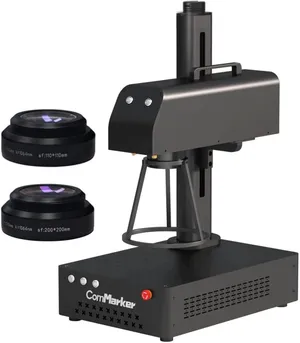
| Work area | 200 × 200 mm (7.9 × 7.9 in). Two field lenses included: 110 × 110 mm for fine detail and 200 × 200 mm; electric lift column |
| Max speed | 15,000 mm/s (maker rating) |
| Laser class | Open-beam galvo (Amazon lists 'Class 1'; see notes) |
| Cuts wood | Not designed for cutting |
| Clear acrylic | No |
| Metal | Deep-engraves metal |
| Air assist | Not available |
| Camera | No |
| Autofocus | No |
| Rotary | Optional add-on |
| Software | EZCAD2 (included), LightBurn (galvo license sold separately) |
| Connectivity | USB |
| Weight | 24.3 lb |
| Warranty | Not stated on the listing — confirm before buying |
| Price tier | $$ Mid-range ($500–$1,500). See Amazon for today's price. |
- Amazon's spec table lists the 20 W source as 'Max' (Max Photonics) and the 30/50/60 W sources as Raycus. The 20 W is a standard Q-switched source, not MOPA, so no color marking.
- The listing's 'CLASS 1 LASER PRODUCT and power output 1.95mW' line doesn't match an open-beam galvo marker. Treat it as Class 4 in practice and use the supplied 1064 nm goggles.
- Engraving depth quoted on the listing is 0.3–0.5 mm; TechRadar cites 0.3 mm. Deep relief work is possible but slow at 20 W.
- ComMarker's Feb 2026 buying guide marks the B4 as clearance and points buyers to the B6; check stock before featuring it.
- TechRadar saw $1,719 on Amazon in 2024; Amazon showed $1,399 on Oct 29, 2026.
Bundles and power options
Each option is a separate Amazon listing. Prices are typical street prices, not live.
| Option | What's different | Price |
|---|---|---|
| B4 20W | Our pick: two lenses, foot switch, 1064 nm goggles | Check price |
| B4 30W + rotary | More power plus a rotary chuck | Check price |
| B4 50W | Faster deep engraving and thin-metal cutting | Check price |
Specs are compiled from manufacturer listings and independent reviews and may change between production runs. Laser makers re-bundle often, so confirm what's in the box on the Amazon page before buying.
The ComMarker B4 20W is a desktop fiber laser marker: a 1064 nm Q-switched fiber source whose beam is steered by galvo mirrors across a 110 mm or 200 mm-square field. It does one job, metal, and does it far better than any blue diode can. It costs about $1,400–1,700 on Amazon (Amazon showed $1,399 on October 29, 2026; TechRadar saw $1,719 in 2024), so check today’s price. It’s our budget pick for metal engraving. One caveat up front: ComMarker’s store now lists the B4 as clearance in favor of the B6. To see which metals fiber handles and which it doesn’t, try the material checker.
Who the B4 is for (and who should skip it)
It’s for engravers whose products are mostly metal: stainless tumblers and bottles, dog tags, jewelry, knives, tools, keychains and anodized business cards. TechRadar called it precise and fast, and an ideal option for small businesses. If you price per piece, the profit calculator will show how quickly a metal-only machine can pay for itself at your volumes.
Skip it if you work mainly in wood, leather or acrylic. Fiber won’t cut wood, and wood must be painted before it will take a mark. Skip it if you want camera placement and autofocus, too: focus is manual using red-dot pointers. And if you want color marks on stainless, you need a MOPA source like the one in the xTool F2 Ultra. The B4’s 20 W source is standard Q-switched, so color marking isn’t on the table.
What a 20 W fiber does well
Bare metal is where a fiber laser beats a diode. The B4 marks and engraves bare stainless, aluminum, brass, gold and silver at speeds up to 15,000 mm/s, with no coating or marking spray. Blue-diode machines that claim to “engrave stainless” leave a slow, low-contrast oxide mark; a fiber gives you a crisp result in seconds.
Depth is the limit at this power. The listing quotes 0.3–0.5 mm, and TechRadar cites 0.3 mm. Deep relief work is possible but slow at 20 W. If deep engraving or thin-metal cutting is the business, the B4 50W (about $2,399) is ComMarker’s faster option, and the 30 W + rotary bundle (about $1,599) adds power and a rotary chuck.
Two field lenses come in the box: 110 × 110 mm for fine detail and 200 × 200 mm for larger items. An electric lift column sets the working height. For software you get EZCAD2, which works but feels dated. LightBurn makes the experience much friendlier once you pay for its galvo license.
What you’ll need beyond the box
- 1064 nm eye protection for everyone in the room. The listing’s “Class 1, 1.95 mW” line doesn’t describe an open-beam galvo marker. The FDA’s laser hazard classes describe Class IV as an immediate eye and skin hazard from the direct or reflected beam, and shiny metal reflects. A pair of 1064 nm goggles comes in the box; buy extra pairs, such as the Cloudray 1064 nm goggles, for anyone else nearby, or add ComMarker’s enclosure. Blue-diode glasses do nothing against this beam.
- Fume extraction. There’s no air assist and no enclosure, so smoke from coatings and anodizing rises straight off the part. ComMarker sells its own fume extractor, or you can set up an extractor intake close to the field and vent it outside. Our ventilation guide explains the options.
- A rotary for tumblers. ComMarker’s optional D69/D80 rotaries handle cylinders. Powder-coated tumblers and anodized aluminum cards make cheap test pieces.
- A fire extinguisher and a clear bench. Coatings can flare. Keep an ABC extinguisher nearby and never leave the machine running unattended.
See the accessories page for more.
Reliability and warranty
ComMarker says all its products are covered by a warranty service, but our data doesn’t confirm the B4’s term, so read the warranty on the listing you buy from. The clearance status matters more than the warranty term. ComMarker’s February 2026 buying guide steers buyers to the B6, so ask about parts and support before you buy, especially if you’re paying close to the old $1,719 price. On the plus side, the B4 is an established design that TechRadar reviewed favorably, with LightBurn support that keeps it usable beyond ComMarker’s own software.
Bottom line
If metal is the job, a fiber beats any diode, and at about $1,400 the B4 20W is the cheapest established fiber we track: two lenses, goggles and a foot switch in the box, plus LightBurn support. It’s also a bare industrial tool with an open beam, manual focus and no use on unpainted wood. Want wood and metal in one enclosed, camera-guided box? Buy the xTool F1 Ultra. Only marking metal occasionally alongside diode work? The portable xTool F2 may be enough. Our best laser engraver for metal guide compares all three.
Accessories for the ComMarker B4 20W
Official and universal add-ons sold on Amazon — safety glasses, fume extraction, air assist, rotaries and materials. Check the listing confirms your exact model before you buy.
- SafetyCARLANY 190–490 nm OD6+ laser safety glassesUniversal fit
Blue-diode protection for anyone near an open-frame laser, or when you lift the lid or override an interlock on an enclosed one. Covers 445–455 nm blue diodes only; does not protect against 1064 nm IR/fiber or 10.6 µm CO2. Match the OD rating to your laser's wavelength.
- SafetyCloudray 1064 nm laser safety gogglesCompatible, third-party
The invisible 1064 nm beam of fiber and IR lasers needs its own eyewear; blue-diode glasses won't stop it. For 1064 nm sources only. Dual-laser machines need protection for both wavelengths; check the OD rating on the listing.
- SafetyAmerex B417T 2.5 lb ABC fire extinguisher with bracketUniversal fit
Lasers cut by burning; a small ABC extinguisher mounted beside the machine is the cheapest fire insurance you can buy. Dry-chemical powder can ruin a laser's optics and electronics; LightBurn recommends a CO2 extinguisher for the machine itself.
- SafetyAmerex 322 5 lb carbon dioxide (CO2) fire extinguisherUniversal fit
Class B:C CO2 leaves no powder residue, so it puts out a fire in the machine without destroying the optics. Pricier than ABC; not rated for Class A (wood/paper) fires on its own, so keep a fire blanket too.
- SafetyPrepared Hero emergency fire blanket, 39 × 39 in (2-pack)Universal fit
Smothers a flare-up on the bed without coating the machine's optics in extinguisher powder.
- Fumes & enclosureAC Infinity Cloudline S4 4-inch inline duct fan with speed controllerUniversal fit
Boosts a laser's built-in exhaust over long duct runs so smoke actually leaves the room. Check your machine's exhaust port diameter; adapters may be needed.
- Fumes & enclosureVIVOSUN 4-inch aluminum ducting, 25 ft with clampsUniversal fit
Replaces short stock hoses so you can reach a window or wall vent; foil duct tolerates hot exhaust better than vinyl.
- Materials3 mm basswood plywood sheets, 12 × 12 in (12-pack)Universal fit
The default test and project stock for every laser here; 12 × 12 in fits all but the smallest beds. Cut down for the 150 mm A1C or galvo machines.
- MaterialsVIBRATITE 4-inch square black slate coasters (60-pack)Universal fit
Best-selling laser blank: slate engraves light grey on black with any diode, CO2 or IR source.
- MaterialsLaserable leatherette hat patches with adhesive, 3 × 2 in (50-pack)Universal fit
Cheap, fast-selling patch blanks that engrave cleanly with diode and CO2 lasers. Not for fiber-only lasers such as the ComMarker B4.
Compatibility checked October 2026. More in our laser engraver accessories guide.
Featured in our guides
- The Best Laser Engraver for Metal in 2026: Fiber, IR and Diode Options
- The Best Laser Engraver for Tumblers in 2026: Rotary-Ready Picks
- Best Portable Laser Engraver: 7 Galvo and Compact Picks for 2026
- Diode vs CO2 vs Fiber Laser: Which Type Do You Actually Need?