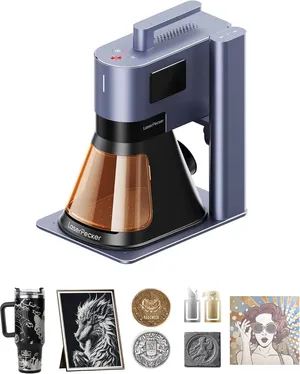
LaserPecker LP5 specs
| Brand | LaserPecker |
|---|---|
| Laser type | Dual laser (Blue diode + 1064 nm fiber) |
| Output power | 20 W fiber + 20 W diode (output) |
| Format | Galvo (portable) |
| Work area | 160 × 120 mm (6.3 × 4.7 in). 160 × 300 mm with the Slide Extension |
| Max speed | 10,000 mm/s (maker rating) |
| Laser class | Class 4 (Class 1 with optional enclosure) |
| Cuts wood | Up to 20 mm (maker claim) |
| Clear acrylic | No |
| Metal | Deep-engraves metal |
| Air assist | Not available |
| Camera | No |
| Autofocus | No |
| Rotary | Optional add-on |
| Software | LaserPecker Design Space (PC + app), LightBurn |
| Connectivity | USB, Wi-Fi, app |
| Weight | 13.3 lb |
| Warranty | 1 year |
| Price tier | $$$ Premium ($1,500–$3,500). See Amazon for today's price. |
- LaserPecker claims cuts of 20 mm basswood, 15 mm dark acrylic and 1 mm brass, stainless, aluminum or titanium; pass counts aren't stated.
- LaserPecker's site describes 'Class 1 enclosed safety', but Tom's Hardware notes the base unit is Class 4 with a small gap in the shield and becomes Class 1 only inside the optional enclosure.
- Tom's Hardware's 3D relief on a brass coin took over 4 hours, so deep metal work at 20 W is slow.
- LaserPecker doesn't state the diode wavelength on its product page. Its own store listed LP5 bundles as back-ordered on Oct 29, 2026, while Amazon had stock.
- No camera or autofocus on the base unit (focus by aligning two red dots on the electric stand); the optional enclosure adds a 5 MP alignment camera.
Bundles and power options
Each option is a separate Amazon listing. Prices are typical street prices, not live.
| Option | What's different | Price |
|---|---|---|
| LP5 + Enclosure | Adds the Class 1 enclosure with camera; cheaper than the bare unit on Oct 29, 2026 | Check price |
| LP5 Basic | Laser unit, electric stand and cone shield | Check price |
| LP5 Ultimate | Adds rotary extension, slide extension and air purifier | Check price |
Specs are compiled from manufacturer listings and independent reviews and may change between production runs. Laser makers re-bundle often, so confirm what's in the box on the Amazon page before buying.
The LaserPecker LP5 is a portable galvo laser that packs a 20 W 1064 nm fiber and a 20 W blue diode into a roughly 6 kg kit, the lightest dual-source laser we track. It’s built for mobile engravers who want metal and wood capability they can carry. The base unit costs about $2,899 on Amazon, and the bundle with LaserPecker’s Class 1 enclosure was slightly cheaper (about $2,836) on October 29, 2026, so check both before you buy. If you’re weighing it against bigger enclosed machines, the laser matcher can sort out what your projects actually need.
Who the LP5 is for (and who should skip it)
It’s for engravers who travel: event personalization, mobile jewelry engraving, market stalls with metal and wood products. If you have to load and unload the machine every week, a 6 kg kit versus the xTool F1 Ultra’s 32 lb makes a difference you’ll feel.
Skip it if the laser will stay on one bench. The xTool F1 Ultra gives you a bigger field (220 × 220 mm vs 160 × 120 mm), an enclosure, a camera and better presets for about $400 less. Skip it, too, if you’re new to lasers and want the software to guide you. And if you only engrave metal, a dedicated fiber like the ComMarker B4 20W costs about half as much.
What it does well
Tom’s Hardware found the LP5 engraves just about anything, and the spec sheet backs that up. The fiber handles bare stainless, brass, aluminum and titanium, including deep 3D relief on metal and stone. The diode covers wood, leather, slate and dark acrylic. LaserPecker claims cuts of 20 mm basswood, 15 mm dark acrylic and 1 mm of brass, stainless, aluminum or titanium, without saying how many passes, so expect several. Galvo speed tops out at 10,000 mm/s, and a Slide Extension stretches the field to 160 × 300 mm.
Depth takes time at this power. Tom’s Hardware’s 3D relief on a brass coin took over 4 hours. Fine for a one-off showpiece, too slow for production relief work.
Where it falls short
The software is the main complaint. Tom’s Hardware found LaserPecker’s app clunky, with no material presets and no job-time estimate, so you build your own settings library by trial and error. LightBurn support is the escape hatch: if you already use LightBurn, the LP5 is easier to live with than the F1 Ultra, where LightBurn needs current xTool firmware and the cameras only work in xTool Studio.
The base unit also has no camera or autofocus. You focus by aligning two red dots using the electric stand. The optional enclosure adds a 5 MP alignment camera, which is another reason to buy the bundle. There’s no air assist either, so wood engraving tends to char.
What you’ll need beyond the box
- The enclosure, or eyewear for two wavelengths. The base unit’s cone shield leaves a gap, so it’s Class 4 as sold. The LP5 safety enclosure makes it Class 1 and adds the camera, but the LP5 + Enclosure bundle is the cheaper way to get it. Without the enclosure, use eyewear rated for both the blue diode and 1064 nm, such as Cloudray 1064 nm goggles for the fiber plus CARLANY blue-light glasses for the diode, worn to match the source you’re running.
- Fume handling. LaserPecker builds in an exhaust fan, but the smoke still needs to leave the room. The LP5 Ultimate (about $3,899) adds an air purifier along with the rotary and slide extensions. Otherwise, vent outside, as our ventilation guide explains.
- Rotary, if you engrave tumblers or rings. LaserPecker’s Rotary Extension is optional unless you buy the Ultimate bundle.
- Fire basics. A small ABC extinguisher, and never leave it running unattended, especially when cutting wood.
The accessories page lists LP5-specific add-ons.
Reliability and warranty
LaserPecker lists a 12-month warranty. On October 29, 2026, LaserPecker’s own store showed LP5 bundles as back-ordered while Amazon had stock, so Amazon may be the faster route. Check the seller and warranty terms at checkout. Note that LaserPecker doesn’t publish the diode’s wavelength, which matters when you buy safety glasses. Rather than guess, pick blue-light glasses rated across a broad band (the CARLANY pair above covers 190–490 nm) and confirm with LaserPecker if you’re unsure.
Bottom line
The LP5 is powerful and genuinely portable, but you work harder for good results than on its main rival, and the base unit isn’t fully shielded. Unless the 6 kg weight decides it for you, the xTool F1 Ultra is the better buy for less money. If you do choose the LP5, buy the enclosure bundle. Our F1 Ultra vs LP5 comparison covers the trade-offs in detail, and the best laser engraver for metal guide shows the alternatives, including the faster xTool F2 Ultra.
Accessories for the LaserPecker LP5
Official and universal add-ons sold on Amazon — safety glasses, fume extraction, air assist, rotaries and materials. Check the listing confirms your exact model before you buy.
- Fumes & enclosureLaserPecker LP5 safety enclosure with alignment cameraOfficial LaserPecker
Turns the LP5 into a Class 1 setup with a camera and smoke control, which you need for indoor or in-store use. The LP5 + Enclosure Amazon bundle was cheaper than buying both separately on Oct 29, 2026.
- SafetyCARLANY 190–490 nm OD6+ laser safety glassesUniversal fit
Blue-diode protection for anyone near an open-frame laser, or when you lift the lid or override an interlock on an enclosed one. Covers 445–455 nm blue diodes only; does not protect against 1064 nm IR/fiber or 10.6 µm CO2. Match the OD rating to your laser's wavelength.
- SafetyCloudray 1064 nm laser safety gogglesCompatible, third-party
The invisible 1064 nm beam of fiber and IR lasers needs its own eyewear; blue-diode glasses won't stop it. For 1064 nm sources only. Dual-laser machines need protection for both wavelengths; check the OD rating on the listing.
- SafetyAmerex B417T 2.5 lb ABC fire extinguisher with bracketUniversal fit
Lasers cut by burning; a small ABC extinguisher mounted beside the machine is the cheapest fire insurance you can buy. Dry-chemical powder can ruin a laser's optics and electronics; LightBurn recommends a CO2 extinguisher for the machine itself.
- SafetyAmerex 322 5 lb carbon dioxide (CO2) fire extinguisherUniversal fit
Class B:C CO2 leaves no powder residue, so it puts out a fire in the machine without destroying the optics. Pricier than ABC; not rated for Class A (wood/paper) fires on its own, so keep a fire blanket too.
- SafetyPrepared Hero emergency fire blanket, 39 × 39 in (2-pack)Universal fit
Smothers a flare-up on the bed without coating the machine's optics in extinguisher powder.
- Fumes & enclosureAC Infinity Cloudline S4 4-inch inline duct fan with speed controllerUniversal fit
Boosts a laser's built-in exhaust over long duct runs so smoke actually leaves the room. Check your machine's exhaust port diameter; adapters may be needed.
- Fumes & enclosureVIVOSUN 4-inch aluminum ducting, 25 ft with clampsUniversal fit
Replaces short stock hoses so you can reach a window or wall vent; foil duct tolerates hot exhaust better than vinyl.
- Materials3 mm basswood plywood sheets, 12 × 12 in (12-pack)Universal fit
The default test and project stock for every laser here; 12 × 12 in fits all but the smallest beds. Cut down for the 150 mm A1C or galvo machines.
- MaterialsVIBRATITE 4-inch square black slate coasters (60-pack)Universal fit
Best-selling laser blank: slate engraves light grey on black with any diode, CO2 or IR source.
Compatibility checked October 2026. More in our laser engraver accessories guide.
Featured in our guides
- Best Portable Laser Engraver: 7 Galvo and Compact Picks for 2026
- xTool F1 Ultra vs LaserPecker LP5: Which 20 W Fiber + Diode Laser to Buy?