xTool S1 40W vs xTool P2S 55W: Enclosed Diode or Desktop CO2?
Our top picks
 Best overall if you can vent: 55 W CO2, clear acrylic, dual cameras, about $2,919xTool P2S 55W Desktop CO2 Laser55 W co2 · Enclosed · 600 × 305 mm8.7Price tier: PremiumCheck price on Amazon
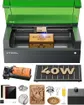 Best Class 1 cutter for shared spaces: 40 W diode, 498 × 319 mm bed, about $1,819xTool S1 40W Enclosed Diode Laser40 W diode · Enclosed · 498 × 319 mm8.5Price tier: PremiumCheck price
 CO2 with Class 1 certification: 80 W, 36 × 18 in bed, about $6,299–7,899xTool P3 80W Flagship CO2 Laser80 W co2 · Enclosed · 915 × 458 mm8.6Price tier: ProCheck price
 Budget CO2 for clear acrylic: about $760–800, for tinkerersOMTech K40+ 45W Desktop CO2 Laser45 W co2 · Enclosed · 300 × 200 mm7.0Price tier: Mid-rangeCheck price
 Cheaper Class 1 diode: 20 W, autofocus and camera, about $1,099Creality Falcon A1 Pro 20W20 W diode · Enclosed · 358 × 268 mm8.2Price tier: Mid-rangeCheck price
If you want one xTool box that cuts thick wood and you have about $2,000–3,000 to spend, it comes down to these two. The xTool S1 40W is the most powerful enclosed diode we track, and the xTool P2S is our best overall laser, a 55 W desktop CO2. Both autofocus, both run LightBurn, and xTool claims both cut 18 mm wood in a single pass. Under the lid, though, they’re different kinds of laser, and this pair is the clearest way to see the diode-or-CO2 trade-off. For the full background, read diode vs CO2 vs fiber. Prices are the lowest we saw on Amazon on October 29, 2026; check today’s price before you buy.
The specs, side by side
| xTool S1 40W | xTool P2S | |
|---|---|---|
| Price (Amazon) | About $1,819 (“Rotary Bundle” listing) | About $2,919 |
| Laser | 40 W blue diode (455 nm, output) | 55 W CO2 glass tube (10.6 µm, xTool rating) |
| Work area | 498 × 319 mm; 470 × 3,000 mm with conveyor | 600 × 305 mm; passthrough for 3,000 mm stock |
| Height clearance | 42 mm; 125 mm with riser | 215 mm object height with riser |
| Max speed | 600 mm/s | 600 mm/s |
| Laser class | Class 1 | Class 4 (enclosed lid) |
| Camera | No (laser-pointer positioning) | Dual 16 MP |
| Autofocus | Yes (multi-point probe) | Yes (LiDAR) |
| Air assist | Optional add-on | Built in |
| Wood cutting (maker claim) | 18 mm cherry, single pass | 18 mm basswood, single pass |
| Clear acrylic | No | Yes (20 mm in one pass, maker claim) |
| Metal | Marks bare metal slowly; optional 2 W IR | Coated metal only |
| Software | xTool Creative Space / Studio, LightBurn | xTool Studio / Creative Space, LightBurn |
| Weight | 44.1 lb | 99.2 lb |
| Our score | 8.5 | 8.7 |
The real difference: wavelength
The S1’s 455 nm beam is visible blue light. Wood, leather and dark acrylic absorb it well, but transparent material doesn’t. xTool’s own material guide notes that clear acrylic transmits visible-wavelength lasers. MakerHacks warns that the S1’s 40 W rating may lead buyers to expect CO2 results: it cut black acrylic easily but couldn’t cut clear or glitter acrylic.
The P2S’s 10.6 µm beam is absorbed by almost every non-metal. The Gadgeteer singled out its ability to cut every acrylic it tried, from clear and colored to glitter and mirrored. It also etches glass. If acrylic signs, earrings, cake toppers or lamps are part of your plan, this alone decides it. Check any material in the material checker.
Metal goes the other way. Neither machine is a metal marker, but the S1’s blue diode leaves a slow, dark mark on bare stainless, and its optional 2 W IR module handles bare metal properly. The P2S’s CO2 beam marks only coated or anodized metal, or bare metal with marking spray.
Where the P2S wins
Material range. Clear acrylic, glass, and every acrylic color, plus everything the S1 does with wood, leather and paper.
Cutting. Both carry an 18 mm single-pass claim, but in our research the 55 W CO2 gets through thick stock faster than the 40 W diode, and the P2S’s claim covers 20 mm acrylic too. Its built-in dual-cylinder air pump comes standard, while the S1’s air assist is an extra.
Ease of use. Dual 16 MP cameras let you place designs on scrap and batch-fill a sheet, and LiDAR autofocus handles curved surfaces. The Gadgeteer found the wide-view camera’s image quality poor, but positioning still works. The S1 has no camera at all. You position with a red crosshair and jog controls, which MakerHacks found accurate but expects to put some buyers off.
Bed and height. 600 mm wide versus 498 mm, and up to 215 mm object height with the riser versus 125 mm.
Where the S1 wins
Safety class. The S1 is Class 1, so nobody in the room needs goggles with the lid shut. The P2S we track is rated Class 4 despite its enclosed lid. That’s fine in a garage or studio where you control the room, but it’s a harder sell in a classroom or a shared office. xTool’s product page mentions a Class 1 variant of the P2S. If that’s what you want, confirm which version a listing is before you order.
Upkeep. The S1’s diode module has no gas tube, water loop or mirrors. The P2S beam comes from a water-cooled glass tube: setup includes filling its tank with distilled water and antifreeze, then running the optical path alignment, per The Gadgeteer. xTool says the tube lasts 6,000–8,000 hours, fading to about 95% power at 1,000 hours and about 70% by the end, and mirrors need periodic cleaning. xTool has made that easier with an alignment indicator and quick-install mirrors, but it’s still more to look after.
Size and price. At 44.1 lb, the S1 fits on an ordinary sturdy desk. The P2S weighs 99.2 lb in a box about a meter wide, so plan a sturdy bench. The S1 also costs about $1,100 less.
Metal option. The S1’s optional 2 W IR head adds proper bare-metal marking. The P2S has no such option; in xTool’s lineup, that’s the P3.
The S1 comes with two buying caveats. Amazon’s only S1 listing is titled “Rotary Bundle”, and we couldn’t confirm the RA2 Pro rotary is in the box, so check before you count it. And xTool’s Canadian store listed the S1 under clearance in October 2026, so stock may thin.
Ventilation applies to both
Neither machine is smoke-free. Both need their exhaust hose run outside, ideally with a duct fan like the AC Infinity Cloudline S4 and VIVOSUN 4-inch ducting for longer runs, or a purifier. xTool pairs both with the SafetyPro AP2 when you can’t vent outdoors. Cutting thick wood and acrylic makes heavy smoke, and some acrylic fumes are harmful, so take this seriously. See the ventilation guide and keep an ABC extinguisher beside either machine.
Worthwhile add-ons: the S1 Riser Base keeps the S1 Class 1 with rotary and tall items. For the P2S, the P2 Honeycomb Panel 2.0 stops small parts dropping through, and clear cast acrylic sheets are the material that justifies buying it.
Who should buy which
Buy the xTool P2S if you can vent a laser outdoors in a garage, workshop or studio; you want to cut acrylic of any color or etch glass; and you’d like cameras to make placement easy. It’s the most versatile laser for the money in our guide, and the P2S Versatile Bundle adds the rotary, riser and conveyor if you’ll use them.
Buy the xTool S1 40W if the laser lives in a home office, classroom or shared space where Class 1 matters; you mainly cut and engrave wood, leather and dark acrylic; you want the option of bare-metal marking; or you don’t want to look after a tube and water loop.
Consider something else if you want CO2 and Class 1: the xTool P3 is certified Class 1 but costs about $6,299–7,899 and weighs 231.5 lb. For clear acrylic on a tight budget, the OMTech K40+ costs about $760–800 but has a small 300 × 200 mm bed, manual focus and mirror alignment. For a cheaper Class 1 diode, the Creality Falcon A1 Pro has 20 W and a camera for about $1,099.
Verdict
If you can vent it and don’t need Class 1, the xTool P2S is the better machine. It handles everything the S1 does plus clear acrylic and glass, with cameras and stronger air assist, and that’s why it’s our best overall pick. The xTool S1 40W is the right answer when the room decides: it’s the strongest cutter you can run in a shared space without goggles, and it’s simpler to own. For more options, see the best laser cutters for wood and the best enclosed laser engravers.
Frequently asked questions
Can the xTool S1 cut clear acrylic?
Is the xTool P2S safe to use at home?
How long does the P2S laser tube last?
Which cuts wood faster, the S1 or the P2S?
Sources
- xTool P2S 55W desktop CO2 laser product page · checked 2026-10-30 — Cuts 20 mm clear acrylic in one pass; tube life 6,000–8,000 hours with power falling to about 95% at 1,000 hours and about 70% at end of life; optical path alignment indicator; Class 4 and Class 1 variants offered.
- MakerHacks: xTool S1 review · checked 2026-10-30 — Can't cut clear or glitter acrylic despite 40 W; cuts black acrylic easily; no camera, red-crosshair positioning; touch-probe autofocus occasionally missed small items; no tube to maintain; LightBurn supported.
- The Gadgeteer: xTool P2S review · checked 2026-10-30 — Cuts all types of acrylic including clear, glitter and mirrored; setup includes filling the water tank with distilled water and antifreeze and running optical path setup; wide-view camera image quality is poor.
- xTool Support: Material Processing Guide · checked 2026-10-30 — Transparent acrylic transmits visible-wavelength lasers; most non-metals absorb 10.6 µm CO2 light well.
Get new guides by e-mail
One short e-mail when Laser Engravers Guide publishes a new guide. No spam, no sharing your address, and you can unsubscribe in one click.