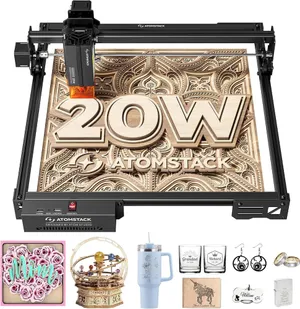
A20 Pro V2 specs
| Brand | Atomstack |
|---|---|
| Laser type | Diode (455 nm blue diode) |
| Output power | 20 W diode (output; dual-beam module, 120 W input) |
| Format | Open frame |
| Work area | 400 × 365 mm (15.7 × 14.4 in) |
| Max speed | 400 mm/s (maker rating) |
| Laser class | Class 4 |
| Cuts wood | Up to 12 mm (maker claim) |
| Clear acrylic | No |
| Metal | Marks bare metal |
| Air assist | Optional add-on |
| Camera | No |
| Autofocus | No |
| Rotary | Optional add-on |
| Software | Atomstack app/PC, LightBurn, LaserGRBL |
| Connectivity | USB, Wi-Fi (2.4 GHz), app |
| Warranty | Not stated on the listing — confirm before buying |
| Price tier | $ Budget (under $500). See Amazon for today's price. |
- The 12 mm one-pass wood figure comes from Atomstack's comparison table on the Amazon listing; Atomstack's own A20 Pro V2 spec page gives no cut depth.
- The '48W' in the A40 Pro V2 title is marketing; Atomstack's own comparison table lists a 40 W laser module output.
- Atomstack lists 304 mirror stainless steel as engravable. Expect a slow surface mark, not the contrast of an IR or fiber laser.
- Amazon pools ratings across the A10/A20/A40 Pro V2 variants (281 ratings shown on each), so the rating isn't specific to the A20.
- We found no hands-on review of the V2 from a major outlet; the score leans on specs and owner reports and is deliberately cautious.
Bundles and power options
Each option is a separate Amazon listing. Prices are typical street prices, not live.
| Option | What's different | Price |
|---|---|---|
| A10 Pro V2 (10W) | Half the power, 410 × 380 mm bed, 6 mm wood per pass (maker) | Check price |
| A20 Pro V2 | Our pick: 20 W, machine only | Check price |
| A20 Pro V2 + F80 air assist | Adds the F80 air pump most cutting jobs need | Check price |
| A40 Pro V2 | 40 W module with auto air assist, 400 × 392 mm (sold as '48W') | Check price |
Specs are compiled from manufacturer listings and independent reviews and may change between production runs. Laser makers re-bundle often, so confirm what's in the box on the Amazon page before buying.
The Atomstack A20 Pro V2 is an open-frame 20 W diode laser with a 400 × 365 mm bed, LightBurn support and a price around $390 (check today’s price). It’s the cheapest way in our guide to get real 20 W cutting power and a 40 cm-class bed. It’s also an open Class 4 machine with manual focus, no camera and no air assist in the base box, so the sticker price isn’t what you’ll spend. If you’re weighing it against an enclosed laser, the laser matcher can help you decide.
Who the A20 Pro V2 is for (and who should skip it)
It’s for hobbyists who have used a laser before, or are happy to learn, and have a garage, workshop or spare room where an open-frame laser can live behind a door. If you want to cut plywood for boxes, signs and ornaments and you’d rather spend on power than enclosure and convenience, it delivers more watts per dollar than any enclosed machine here.
Skip it if it’s going in a shared room, if there are kids or pets nearby, or if you’ve never used a laser. An open diode beam and its reflections are an eye hazard for everyone in the room, not just the operator. The Creality Falcon A1C costs about the same and is Class 1, though with a much smaller bed and less power. The Creality Falcon A1 and xTool M2 are the safer full-size buys.
Key capabilities
The 20 W optical output comes from a dual-beam module (Atomstack quotes 120 W electrical input; the 20 W is what reaches the material). Atomstack’s comparison table on the Amazon listing claims 12 mm wood in one pass, roughly double what a 10 W diode manages. Atomstack’s own spec page gives no cut depth, and we found no hands-on review of the V2 from a major outlet, so our score leans on specs and owner reports and is deliberately cautious.
Software is a strength. LightBurn and LaserGRBL both work, as well as Atomstack’s app, over USB or 2.4 GHz Wi-Fi. That means the A20 can grow with you, and skills carry over to any LightBurn-compatible machine you buy later. Our LightBurn guide explains why that matters.
On metal, Atomstack lists 304 mirror stainless as engravable. Expect a slow, low-contrast surface mark, not the crisp result of an IR or fiber laser. Coated tumblers and anodized aluminum are the realistic metal jobs. See the material checker.
Day-to-day use
This is where open frames cost you time. Focus is manual, there’s no camera to place designs, and you’ll frame each job with the laser head before burning. None of that is hard, but it’s slower than a camera-guided enclosed box. The 400 mm/s rated speed is fine for engraving.
Atomstack sells the same frame in other powers: the A10 Pro V2 (10 W, about $230) and the A40 Pro V2 (40 W with auto air assist, about $720, sold as “48W” though Atomstack’s own table lists 40 W output). The A20 sits in the middle on price and power.
What you’ll need beyond the box
Budget roughly $200 on top of the machine before your first cut.
- Eye protection for everyone in the room. 445–455 nm-rated glasses (about $28 a pair). Buy one for each person who might be present.
- Enclosure and ventilation. An enclosure with an exhaust fan (about $47) contains smoke and stray light. Measure first: the A20’s footprint is close to that enclosure’s 700 × 720 mm limit. An enclosure doesn’t make it Class 1. Duct the exhaust outside; our ventilation guide covers how.
- Air assist. Not in the base box. Buy the A20 + F80 bundle (about $460) rather than the F80 pump separately (about $110).
- Rotary. Optional. A roller rotary (about $80) is a common choice for tumblers on GRBL diodes; confirm the connector.
- Fire safety. Flame detection needs the optional Z2 slider. Keep an extinguisher beside it and never leave a job running. The safety guide covers the rest.
Reliability and warranty
Amazon pools ratings across the A10, A20 and A40 Pro V2 listings (281 ratings, 4.2 stars when we checked), so the rating isn’t specific to the A20. Owner reports on after-sales support are mixed. Atomstack also sells a refurbished A20 Pro V2 through its own store. With no major independent review, buy from a seller with a clear return policy.
Bottom line
The A20 Pro V2 is a lot of cutting power and bed for about $390, with LightBurn support that keeps it useful as your skills grow. The real cost is closer to $600 once you add goggles, an enclosure, ventilation and air assist, and you still get manual focus and no camera. For a workshop and a buyer comfortable with open-frame lasers, it’s strong value. For a shared room or a first laser, pick an enclosed machine from our budget roundup. Check the bundle and price on Amazon.
Accessories for the A20 Pro V2
Official and universal add-ons sold on Amazon — safety glasses, fume extraction, air assist, rotaries and materials. Check the listing confirms your exact model before you buy.
- Air assistAtomstack F80 air assist pump, 10–60 L/minOfficial Atomstack
The base A20 Pro V2 ships without air assist; this is what gives clean, deep cuts with less charring.
- SafetyCARLANY 190–490 nm OD6+ laser safety glassesUniversal fit
Blue-diode protection for anyone near an open-frame laser, or when you lift the lid or override an interlock on an enclosed one. Covers 445–455 nm blue diodes only; does not protect against 1064 nm IR/fiber or 10.6 µm CO2. Match the OD rating to your laser's wavelength.
- SafetyAmerex B417T 2.5 lb ABC fire extinguisher with bracketUniversal fit
Lasers cut by burning; a small ABC extinguisher mounted beside the machine is the cheapest fire insurance you can buy. Dry-chemical powder can ruin a laser's optics and electronics; LightBurn recommends a CO2 extinguisher for the machine itself.
- SafetyAmerex 322 5 lb carbon dioxide (CO2) fire extinguisherUniversal fit
Class B:C CO2 leaves no powder residue, so it puts out a fire in the machine without destroying the optics. Pricier than ABC; not rated for Class A (wood/paper) fires on its own, so keep a fire blanket too.
- SafetyPrepared Hero emergency fire blanket, 39 × 39 in (2-pack)Universal fit
Smothers a flare-up on the bed without coating the machine's optics in extinguisher powder.
- Fumes & enclosureAC Infinity Cloudline S4 4-inch inline duct fan with speed controllerUniversal fit
Boosts a laser's built-in exhaust over long duct runs so smoke actually leaves the room. Check your machine's exhaust port diameter; adapters may be needed.
- Fumes & enclosureVIVOSUN 4-inch aluminum ducting, 25 ft with clampsUniversal fit
Replaces short stock hoses so you can reach a window or wall vent; foil duct tolerates hot exhaust better than vinyl.
- Fumes & enclosureCreality laser engraver enclosure, 700 × 720 × 400 mm, with exhaust fanCompatible, third-party
A fire-resistant tent that contains smoke and stray blue light from open-frame diodes. Measure your frame first: the Ray5 40W and A20 Pro V2 footprints are close to the 700 × 720 mm limit. An enclosure doesn't make a Class 4 laser Class 1; keep goggles on when it's open.
- RotaryOrtur laser rotary roller (Y-axis)Compatible, third-party
An inexpensive, widely used roller rotary for tumblers and cans on open-frame GRBL diodes. Plugs into the Y-axis motor port; confirm your controller's connector and set rotary mode in LightBurn.
- Materials3 mm basswood plywood sheets, 12 × 12 in (12-pack)Universal fit
The default test and project stock for every laser here; 12 × 12 in fits all but the smallest beds. Cut down for the 150 mm A1C or galvo machines.
Compatibility checked October 2026. More in our laser engraver accessories guide.
Featured in our guides
- The Best Budget Laser Engravers Under $500 in 2026 (and the Safety Trade-Offs)
- Laser Engraver Accessories Worth Buying (and the Ones That Can Wait)