Laser Engraver Accessories Worth Buying (and the Ones That Can Wait)
Our top picks
 Rotary bundle was only about $10 more than the bare machineCreality Falcon A1 10W10 W diode · Enclosed · 381 × 305 mm7.9Price tier: Mid-rangeCheck price on Amazon
 Buy the F80 air-assist bundle, not the bare machineAtomstack A20 Pro V220 W diode · Open frame · 400 × 365 mm7.2Price tier: BudgetCheck price
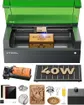 Rotary work needs the riser basexTool S1 40W Enclosed Diode Laser40 W diode · Enclosed · 498 × 319 mm8.5Price tier: PremiumCheck price
Laser makers sell a lot of add-ons, and a new owner can easily spend half the machine price again on things that sit in a drawer. This guide sorts the accessories in our data into what to buy now, what to buy when a project needs it, and what can wait. Fit notes come from the listings and maker pages; we haven’t tested these accessories ourselves. Prices are typical Amazon street prices from October 29, 2026, so check today’s price before you buy.
Buy first: safety and ventilation
These aren’t upgrades. Every laser needs them.
- Ventilation. Duct outdoors with 4-inch foil duct (about $19) and, if smoke lingers, a 4-inch inline fan (about $90). If you can’t vent, a purifier: the xTool Desktop Smoke Purifier (about $249) for light work, or the SafetyPro AP2 (about $919) for heavy cutting. Our ventilation guide explains which.
- Fire gear. A fire blanket 2-pack (about $40) and a C-rated extinguisher. LightBurn prefers CO2 extinguishers because dry chemical powder will destroy the laser; the Amerex ABC extinguisher in our data (about $63) works well on burning material but will likely ruin the machine.
- Eyewear for open-frame and Class 4 machines, rated for the exact wavelength: 445–455 nm blue-diode glasses (about $28) or 1064 nm goggles (about $39) for fiber and IR. Dual-source machines need protection at both. See the safety guide.
- An enclosure for open frames. The Creality enclosure with exhaust fan (about $47) contains smoke and stray light around an A20 Pro V2 or Ray5 40W. Measure first: both are close to its 700 × 720 mm limit.
Worth it if your machine lacks it: air assist
Air assist blows a jet of air at the cut. xTool lists the benefits as better cut and engraving quality, less charring and fewer flare-ups, and a cleaner lens. It doesn’t filter the room’s air.
Many machines in our data have it built in or included (M2, Falcon A1, Falcon A1 Pro, Ray5 40W, K40+, P2S, P3). It’s optional on the S1 and the Atomstack A20 Pro V2, and not available on the F-series, LP5, Glowforge Aura and Falcon A1C.
The clearest buy is on the Atomstack A20 Pro V2. The base kit ships without air assist, and the A20 Pro V2 + F80 bundle cost about $460 against about $390 for the bare machine, so about $70 more. The F80 pump bought alone was about $110. If you plan to cut, start with the bundle.
Worth it for the right projects: rotaries
A rotary turns round objects under the beam so you can wrap a design around a tumbler, glass or ring. It’s the key accessory for a tumbler business and useless if you don’t make round things.
| Item | Type | Fits | Buy |
|---|---|---|---|
| Creality Rotary Roller Pro 3-in-1 kit Jaw-chuck and roller rotary for engraving cups, glasses and rings on Falcon lasers. | Rotary | Falcon A1 10W, Falcon A1 Pro (Sold for 'Falcon and other engraving machines'; Creality also bundles it with the A1 and A1 Pro. Confirm riser height for your model.) | Check price |
| xTool RA2 Pro rotary attachment 4-in-1 rotary for tumblers, glasses, rings and spheres on xTool's enclosed and galvo machines. | Rotary | xTool S1 40W, xTool F1 Ultra, xTool P2S (xTool says it must be used with a riser on enclosed machines; check whether your S1 bundle already includes it.) | Check price |
| xTool RA3 MagSwap smart rotary xTool's newer rotary with LiDAR mapping and magnetic mode swaps, built for the P3 and F-series. | Rotary | xTool P3, xTool F2 Ultra, xTool F1 Ultra, xTool F2 | Check price |
| Ortur laser rotary roller (Y-axis) An inexpensive, widely used roller rotary for tumblers and cans on open-frame GRBL diodes. | Rotary | A20 Pro V2, Ray5 40W (Plugs into the Y-axis motor port; confirm your controller's connector and set rotary mode in LightBurn.) | Check price |
| Creality honeycomb laser bed for Falcon A1 / A1 Pro Sized for the A1 enclosure (the 500 × 500 mm Creality bed doesn't fit) for cleaner cuts and a protected base plate. | Bed & riser | Falcon A1 10W, Falcon A1 Pro | Check price |
| xTool P2 Honeycomb Working Panel 2.0 Stops small cut pieces falling through the slats and cuts backside flashback on the P2S. | Bed & riser | xTool P2S | Check price |
| xTool S1 Riser Base Raises the S1's clearance from 42 mm to 125 mm for rotary work and tall objects while staying Class 1. | Bed & riser | xTool S1 40W | Check price |
| Creality Falcon A1C 1.2W IR laser module Tool-free swap that marks bare stainless, jewelry and dark stone the blue diode can't. | Upgrade | Falcon A1C 10W | Check price |
| xTool Slide Extension for F2 / F1 Stretches the F2's 115 × 115 mm field to 115 × 400 mm for batches of coasters, cards and phone cases. | Upgrade | xTool F2 | Check price |
How to choose:
- Match the maker. Enclosed machines generally need the maker’s rotary. The Creality Rotary Roller Pro (about $114) fits the Falcon A1 and A1 Pro. xTool’s RA2 Pro (about $269) fits the S1, F1 Ultra and P2S, and the newer RA3 (about $349) fits the P3, F2 Ultra, F1 Ultra and F2.
- Check height. xTool says the S1 needs its riser base for rotary work. The S1 Riser Base (about $199) lifts clearance from 42 mm to 125 mm and keeps the S1 Class 1. On the P2S, our data shows rotary diameter of 3–50 mm without a riser and up to 180 mm with one.
- Check diameter. xTool rates the RA2 Pro at 3–198 mm in roller mode, up to 100 mm in the chuck, 25–100 mm spheres and 11–70 mm rings. Measure your blanks’ diameters, and handles, before you order.
- Open frames are cheaper. The Ortur roller rotary (about $80) is a common choice for GRBL open-frame diodes like the A20 Pro V2 and Ray5. It plugs into the Y-axis motor port; confirm your connector and set rotary mode in LightBurn.
Look for bundles first. On October 29, 2026:
- The Falcon A1 + Rotary Roller Pro cost about $559, only about $10 more than the bare Falcon A1 at about $549, while the rotary alone was about $114.
- The Falcon A1 Pro + Rotary Roller kit cost about $1,012, less than the bare A1 Pro at about $1,099.
- The xTool S1’s only Amazon listing is titled “Rotary Bundle” (about $1,819). Confirm the RA2 Pro is in the box before counting on it.
- The OMTech K40+ with rotary axis was about $900, but OMTech’s own help center says the K40 series doesn’t support a rotary. That FAQ may predate the 45 W model; ask the seller before you buy for rotary work.
Prices change daily, so recheck the gap between bundle and bare machine on the day. Our tumbler guide goes deeper on rotary workflows.
Worth it soon: a proper bed
A honeycomb bed lifts the work so the beam doesn’t reflect off a solid plate, and lets smoke clear underneath. The Creality honeycomb for the Falcon A1 / A1 Pro (about $69) is sized for those enclosures; Creality warns that its 500 × 500 mm bed doesn’t fit the A1. For the P2S, the xTool P2 Honeycomb Working Panel 2.0 (about $139) stops small parts dropping through the slats and reduces backside flashback.
Skip it if you only engrave flat blanks on the stock bed. Buy it once you start cutting through sheets.
Buy when you outgrow the machine: upgrades
- xTool Slide Extension for F2 / F1 (about $219): stretches the F2’s 115 × 115 mm field to 115 × 400 mm for batches of coasters or phone cases. Worth it for market sellers doing runs; skip it for one-off gifts.
- Creality Falcon A1C 1.2W IR module (about $239): adds bare stainless and dark stone marking to the Falcon A1C. Note the math: the A1C + IR bundle was about $542, roughly $143 over the 10 W machine, which is cheaper than adding the module later. Remember that blue-diode goggles don’t protect against IR.
- IR heads for the M2 and A1 Pro. Both machines offer IR modules for bare metal and plastics. The A1 Pro + 2W IR bundle was about $1,151.
The cheapest upgrade: good blanks
Learning settings on scraps wastes time; laser-ready blanks give repeatable results and double as products.
| Item | Type | Fits | Buy |
|---|---|---|---|
| 3 mm basswood plywood sheets, 12 × 12 in (12-pack) The default test and project stock for every laser here; 12 × 12 in fits all but the smallest beds. | Materials | Any laser (Cut down for the 150 mm A1C or galvo machines.) | Check price |
| Clear cast acrylic sheets, 12 × 12 × 1/8 in (10-pack) Cast acrylic cuts with flame-polished edges on a CO2 laser; it's the material that justifies buying one. | Materials | xTool P2S, xTool P3, OMTech K40+ (CO2 only: blue diodes pass straight through clear acrylic.) | Check price |
| Laserable leatherette hat patches with adhesive, 3 × 2 in (50-pack) Cheap, fast-selling patch blanks that engrave cleanly with diode and CO2 lasers. | Materials | Any laser (Not for fiber-only lasers such as the ComMarker B4.) | Check price |
| Black anodized aluminum business cards, 0.8 mm (15-pack) Anodized aluminum engraves to a crisp white with blue diodes, CO2, IR and fiber, ideal for test pieces and premium cards. | Materials | Any laser | Check price |
| VIBRATITE 4-inch square black slate coasters (60-pack) Best-selling laser blank: slate engraves light grey on black with any diode, CO2 or IR source. | Materials | Any laser | Check price |
| YOUKE OLA powder-coated 20 oz tumblers for laser engraving (16-pack) Powder coat ablates to bright steel with diode, CO2 or fiber lasers, which makes these the classic rotary product. | Materials | Any laser (Needs a rotary attachment on flatbed machines.) | Check price |
A sensible starter order: 3 mm basswood (about $25 for 12 sheets) for cutting tests, black slate coasters (about $41 for 60) and anodized aluminum cards (about $21 for 15), which engrave on every laser type, and leatherette patches (about $14 for 50). Add powder-coated tumblers (about $63 for 16) once you have a rotary, and clear cast acrylic (about $46 for 10) only if you own a CO2. A blue diode passes straight through it. Check anything else in the material checker.
What we’d skip at first
- A purifier when you can vent outdoors. Duct and a fan cost about $109; xTool’s AP2 filters alone run about $180 a set.
- Rotaries “just in case.” Wait for a round-object project or order.
- Big bundles with extras you haven’t priced. The P2S Versatile Bundle adds an RA3 rotary, riser and conveyor for about $3,948 versus about $2,919 for the machine. That’s good value if you need all three, and $1,000 of shelf decoration if you don’t.
Bottom line
Spend on safety and smoke handling first, air assist second if your machine lacks it, and a bed when you start cutting. Buy a rotary when round objects are actually on your order list, and check whether a bundle undercuts buying it separately. If you’re pricing a full setup for selling, our startup cost guide adds it all up.
Frequently asked questions
What accessories do I need for a laser engraver?
Is air assist worth it on a diode laser?
Do I need a rotary to engrave tumblers?
Does a third-party rotary work with my laser?
Sources
- xTool Support: Air Assist or Smoke Purifier? · checked 2026-10-30 — Air assist improves cut and engraving quality, reduces charring and flare-ups and protects the lens, but doesn't filter the air
- xTool Support: Use Rotary Attachment 2 (RA2) with xTool S1 · checked 2026-10-30 — To use the rotary attachment on the S1 you need to raise it with the riser base
- xTool: RA2 Pro product page · checked 2026-10-30 — Engrave diameter range: roller 3–198 mm, chuck 0–100 mm, sphere 25–100 mm, ring 11–70 mm; works with LightBurn
- LightBurn User Guide: Fire Safety · checked 2026-10-30 — Keep a spray bottle, a C-rated extinguisher and a fire blanket nearby; dry chemical powder will destroy a laser
Get new guides by e-mail
One short e-mail when Laser Engravers Guide publishes a new guide. No spam, no sharing your address, and you can unsubscribe in one click.